
- Store
- Products
- Downloads
- Resources
-
 For Mac
 For Windows
 Home » DVD Ripping Tips » DVD collection to MP4 video for Galaxy Tab 2 7.0
Fast convert DVD collection to MP4 video for Galaxy Tab 2 7.0 on Mac OS X
Samsung Galaxy Tab 2 7.0 as it promoted is a highly portable personal tablet devices that integrates the multimedia, communication and top internet functionality into one. It comes with the high features Rich Contents, Easy Access, Apps Recommendation, AllShare Player, Android 4.0 platform and more that make the Galaxy Tab 2 7.0 attract lots of fans.
Q: I am looking for software advice to rip DVD collection to Mac OS X and then to Galaxy Tab 2 7.0. Any input greatly appreciated. Found some free software out there but looking for experienced advice and not opposed to paying for something that will work well. Any help greatly appreciated.
From the above quoted words from one of the Galaxy Tab 2 7.0 users, we find that the user wanna watch DVD movies on Galaxy Tab 2 7.0, but the user has some confusion of the DVD collection ripping. Here we’d like to give some experienced advice to all the Galaxy Tab 2 7.0 users.
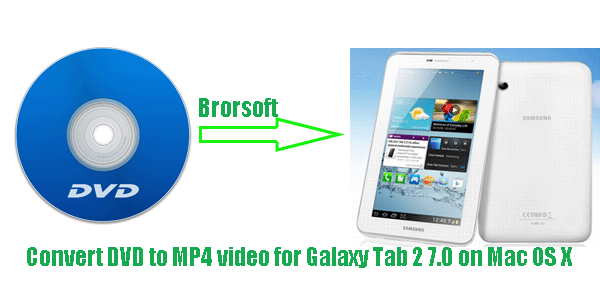
To rip DVDs to Galaxy Tab 2 7.0 on Mac OS X, a piece of easy-to-use DVD ripping software is the key. You may find there are lots of similar tool on the market and some even totally free. While, here according to our tests, we highly recommend the best Mac DVD to Galaxy Tab 2 7.0 Converter to you. It enables you to rip and convert DVD collection to MP4, the best video format for Galaxy Tab 2 7.0 on Mac easily and quickly. What’s more, if wanna backup your DVDs to the hard drive remaining the original DVD structures, this Mac DVD ripper for Galaxy Tab 2 7.0 can also help you make it.
 (Note: Click here for OS X 10.5)
Guide: Convert DVD collection to MP4 video for Galaxy Tab 2 7.0 on Mac OS X
Step 1: Import DVD movie to the best Mac DVD to Galaxy Tab 2 7.0 Converter.
Launch the best Mac DVD to Galaxy Tab 2 7.0 Converter. Click the button like a disc to load DVD movie to it. If necessary, you can have a preview of your movie.
Tip: Freely select the subtitles for you DVD movies from the “Subtitles” option. Thus, you can transfer and enjoy DVD movie on Galaxy Tab 2 7.0 with preferred subtitles.
Step 2: Select the output format and output folder.
Click on the dropdown menu of “Format” and choose the Common video>H.264 Video(*.mp4). This is the optimal format for you to copy DVD movie to Galaxy Tab 2 7.0 on Mac for free-time entertainment. Now, you can set the output folder.
Step 3: Click “Settings” icon to adjust audio and video parameters
Click the “Settings” icon, and you can adjust codec, bit rate, frame rate, sample rate and audio channel in the interface to optimize the output file quality.
Note: Since the native DVD movie resolution is 720*480; thus, set the video size as 720*480 is enough; or you can set the 1024*600 video size according to Galaxy Tab 2 7.0’s screen resolution.
Step 4: Start to rip and convert DVD movie to MP4 for Galaxy Tab 2 7" on Mac.
Click the “Convert” button; it will convert DVD to MP4 for Galaxy Tab 2 7" on Mac immediately. You can find the process in the “Conversion” interface.
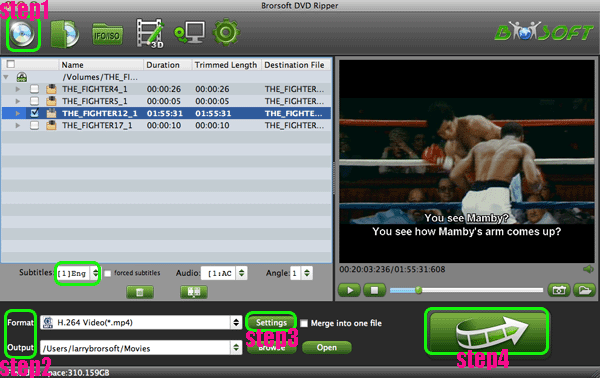
After the conversion is done, you can get the output files for the Galaxy Tab 2 7" via clicking on “Open” button effortlessly. Later, you can transfer DVD movies to Galaxy Tab 2 7" to enjoy on the go and even share with your families and friends with the Samsung AllShare (DLNA) on the HD TV’s big screen.
Tip:
This Mac DVD to Galaxy Tab 2 7.0 Converter can also rip and convert DVD to Galaxy Tab 2 10.1 on Mac for so many Tab 2 10.1 users. Please link to Brorsoft Mac DVD to Galaxy Tab 2 7.0 Converter to learn more.
More information get from Brorsoft DVD to PS Vita Converter.


If you wanna a powerful all-in-one tool to convert videos, Blu-ray movies and DVDs to your computer or portable devices like Google Nexus 10/7, Kindle Fire HD, Samsung Galaxy Note 2, Galaxy S3/4, Galaxy Tab 2 10.1 at the same saving time and effort, the all-in-one Blu-ray Video Converter Ultimate program will be a nice choice for you. If you are running a Mac OS X computer, iMedia Converter Mac is the alternative.
Related guides:
Backup Disney DVD
Rip DVD with Handbrake
Rip Netflix DVD to Videos
Copy Movie Only From DVD
Convert 2D DVD to 3D Video
Reformat DVD movies to Sony Xperia S
How to Convert Video_TS Folder to MP4
Fast rip and convert DVD to Galaxy Tab 2 10.1 with preferred subtitles
Related Products
DVD Ripper for Mac


Useful Tips
- Rip DVD to Android
- Rip DVD to Plex Media Sever
- Convert DVD to AVI
- Convert DVD to MKV
- Convert DVD to WMV
- Rip DVD with VLC Player
- Rip DVD to NAS
- Import DVD to iTunes
- Convert ISO to iTunes
- Rip DVD in Windows 8
- iPhone 6 DVD Playback Tips
- Stream DVD to Chromecast
- Edit DVD in Final Cut Pro
- Convert ISO to MP4
- Import DVD to iMovie
- Copy Full DVD Disc
- Rip DVD to iPad
- Rip DVD with Handbrake
- Mac TheRipper Alternative
- Rip DVD with Subtitles
- Add Subtitles to Hollywood DVD
- Rip DVD to MP4/M4V/MOV
- Import DVD to Windows Movie Maker
Find us on Facebook

Adwards
Copyright © 2017 Brorsoft Studio. All Rights Reserved.