MOD Converter for Mac
- Convert JVC Everio, Panasonic SDR, Canon FS Camcorder MOD Videos/footages on Mac.
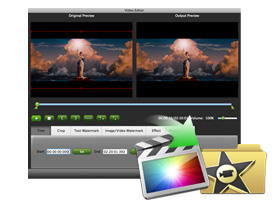
- Transcode MOD videos to Apple ProRes for FCP, AIC and .MOV for FCE and iMovie, etc.
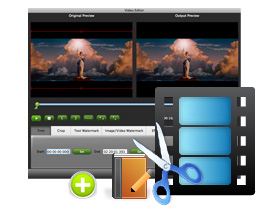
- Deinterlace MOD footages, trim MOD clips, crop MOD sizes, and add different watermarks.
- Fast MOD conversion speed with no quality loss, and perfect audio and video in synchronization.
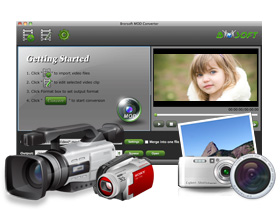
- Brorsoft MOD Converter for Mac is the most powerful, flexible and easy-to-use Mac MOD conversion tool to convert/transcode JVC Everio, Panasonic SDR, Canon FS camcorder MOD footages to various Apple ProRes formats (ProRes 422/ProRes 422 HQ/ProRes 422 LT/ProRes 422 Proxy/ProRes 4444) for editing in FCP, to Apple Intermediate Codec (AIC)(*.mov), QuickTime H.264 MOV, DV/DVCPRO(50)-PAL(*.mov), DV/DVCPRO(50)-NTSC(*.mov), HDV/DVCPRO HD 1080p/i(*.mov) or Avid DNxHD(*.mov), etc. for Final Cut Express, iMovie, Avid Media Composer and more.
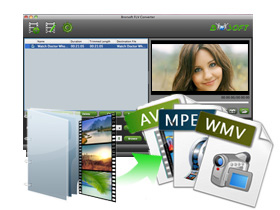
- The best Mac MOD Converter supports to batch convert any kinds of MOD files to various video file formats with super high quality. Moreover, the best Mac MOD Editor allows you to adjust video and audio settings, trim unwanted MOD clips, crop black edges, remove MOD interlaces, set specific effects, add text/image/video watermarks and so on.
- If you would like to convert not only MOD videos on Mac, but also other common videos including MTS/M2TS/AVCHD/AVCHD Lite, MVI, MXF, VRO, TOD, Tivo, MKV, FLV,F4V, WMV, AVI, etc, please choose Brorsoft Video Converter for Mac.
Supported Devices
JVC: GZ-MC100, GZ-MC200, GZ-MG70, GZ-MG30, GZ-MG37, GZ-MG77, GZ-MG505, GZ-MG130, GZ-MG155, GZ-MG255, GZ-MG555, GZ-MS100U, GZ-MG7230, GZ-MG630, GZ-MG670, GZ-MG680 and more
Panasonic: SV-AV100, SDR-S100, SDR-S150, SDR-S10, SDR-H18, SDR-H200, SDR-H20, SDR-H60, SDR-S7, SDR-SW20, SDR-SW21,SDR-S26 and more
Canon: FS100 (SDHC), FS10 (SDHC), FS11 (SDHC), FS200 (SDHC), FS21 (SDHC), FS22 (SDHC) and more
Faster conversion speed
This program optimized its conversion speed, so that you can convert the MOD in less time
Easy to use interface
This program optimized its conversion speed, so that you can convert the MOD in less time
Simple gauss blur effect
Simple gauss blur effect is very useful to recorded file formats, since it can eliminate the recorded videos noise. If you like, you can also add other special effects including simple laplacian sharpen, gray, flip color, invert, aged film and deinterlacing. What is worth mention is the deinterlacing, which can convert interlaced video into a non-interlaced form, so that you can enjoy a better and clearer video effect.
Accurate trim the special length of MOD video
The trim function allows you to get a specific length of MOD video accurately since its inner seek function can capture any key frame of the MOD.
Crop MOD clips
You can cut off the black edges and unwanted MOD video area easily.- Merge multiple videos and replace original audio
You can join multiple videos into one bigger file for conversion, as well as replace the original audio with other sounds you like. - Add text, image, and video watermark
This program supports to add different watermark types, including text, image (including GIF), and video watermark to the MOD. With its video watermark function, you can add a picture-in-picture effect to your video. - Capture the snapshot images
You can capture the snapshots images as your wallpaper or editing elements if you like.
Audio and video sync technology
The program adopted advanced audio and video sync technology; never let you troubled by the audio and video issues.- Built-in codec
Its built-in codec will not install any codec on your computer, so as to avoid the unexpected codec problem.
. 1G Hz or above Intel processor.
. Mac OS X 10.5 or 10.5 above (including Mac OS X v10.5 Leopard, v10.6 Snow Leopard Mac OS X 10.7 Lion and Mac OS X Mountain Lion version 10.8) on iMac, MacBook Pro, Mac Pro, MacBook Air, Mac Mini, etc. (If you are PowerPC user or want to run the program in Mac OS X 10.4, please contact support@brorsoft.com to get it.)
. 512 MB physical RAM (memory) or more.
. 1024*768 or higher resolution display.
- Just purchased your software and it has failed to install on my mac osx 10.5.8, get error message: Install failed. The Installer could not install some files"/ Applications". Contact the software manufacturer for assistance. Any solutions?
Brorsoft products have been updated to support the new Mac Mountain Lion system. This new .pkg file may have problem to install on Mac OS X 10.5.8. If you have this problem pls download the special installation .dmg file for Mac OS X 10.5.8 on our official site. http://www.brorsoft.com/dmg/modconvertermac_install.dmg
Further question, you can contact support@brorsoft.com. - How to remove the watermark in the middle of the converted files?
The watermark is the only difference between the trial version and full version. It can not be removed, even with the full version. Please understand the point and re-convert your original files with the full version. - I Purchased the software and I received the code by email. But how do I enter the number?
Please click the Download link to get the full version of the software, install and launch it, then you will see a box to fill in the registration code to activate it. - How about the quality of the converted video?
Based on the newest audio-video sync technology, MOD Converter for Mac can provide you with outstanding output image and sound quality, never let you get into trouble with the audio and video sync issues. Moreover, multiple optimizing functionalities are available to better the output video quality. - What is the difference between MOD Converter for Mac and Video Converter for Mac?
The difference mainly lies in the input video formats. Brorsoft MOD Converter can help you convert JVC Everio, Panasonic SDR, Canon FS camcorder MOD footages to various Apple ProRes formats for editing in FCP, to Apple Intermediate Codec (AIC)(*.mov), QuickTime H.264 MOV, and Avid DNxHD(*.mov), etc. for Final Cut Express, iMovie, Avid Media Composer and more. Video Converter for Mac, besides all the features of MOD Converter for Mac, can transcode TV shows(*.tivo, *dvr-ms, *.trp, *.tp, *.ts, etc), Flash Video/ YouTube video(*.flv, *.f4v),1080p/1080i/720p HD Video (*.tod, *.m2t, *.m2ts, *.mvi, *.mxf, *.vro, *.ts, *.tp, *.evo, *.mkv, *.dv ), and general Video (AVI, MPEG, WAV, VOB, etc.). - I had purchased the Video Converter for Mac and I ment to buy the same converter but for windows. Is there a way to change my order?
Please contact support@brorsoft.com and our support will provide you with the Wins version. But if you are in urgent need of conversion and can not wait for the reply, please purchase the Wins version and explain your situation to our support and they will refund you. - I’d like to eliminate black bars (edges) from the movie, what should I do?
Please click ‘Edit’ button to enter into the "Video Editor" and switch to the Crop tab, then just drag the dashed frame on the video screen of the original preview window to cut off the unwanted parts to get the right aspect ratio you need. - Can I batch convert video files with this product?
Please follow the simple steps and you can achieve the batch conversion.
Step 1: Launch the Brorsoft software, import all the files you want to convert and select all of them;
Step 2: Click on the dropdown menu of “Format” and then move your pointer to the format you need. You can find all the related formats on a sublist. Please select one that is suitable. After that, choose the output folder;
Step 3: Click the “Settings” icon and you will go into a new interface named “Profile Settings”. You can adjust codec, bit rate, frame rate, sample rate and audio channel in the interface freely and optimize the output file quality.
Step 4: Click the button for conversion and you can let the software do the rest work for you. - When I am trying to do the batch conversion and transcode more than 20 files at the time., video converter kept crashing. Would you have any suggestions how to improve this?
Please decrease the number of the files you want to convert at one time since the process will take much memory space (suppose the size of the input file is 1GB, the memory space needed is almost up to 40 GB) and make the software crash when you click the button for conversion. - How to trim a video?
You can achieve the goal in three ways:
a. Drag Triangle icon below the preview window to locate the beginning and end of your clip during the preview;
b. Press the button to locate the beginning and end of your clip during the preview.
c. Input the certain time number in Set start time and Set end time fields. - How to add a logo into my videos?
Please click on the Editor and then you will go to a new interface, named Video Editor. You can find Image/Video Watermark feature, enable it and you can browse the logo then add to the videos. - How to get the log files?
Please click Windows+ R on your keyboard, fill %appdata% on your keyboard, and then you will go to the Roaming folder. Then please click Brorsoft > mod_converter, and you will find the log files needed. - How to merge the two converted files?
Please select the "Merge into one file" before you click the the button for conversion to make the converted files merged. - Can the license I have got be used in another computer?
No. Please understand that one license code can only be used on one computer. If you want to rip and convert movie on another computer, please contact support@brorsoft.com to purchase another license code at 20%-off discount price.
Input Files: |
|
| MOD Files shot by JVC Camcorders | GZ-MG630 (60 GB HDD, MicroSD); GZ-MG670 (80 GB HDD, MicroSD); GZ-MG680 (120 GB HDD, MicroSD); GZ-MG7230 (30 GB HDD, MicroSD); GZ-MS100U (SD/SDHC card), etc. |
| MOD Files shot by Panasonic Camcorders | SDR-S50 (SD/SDHC/SDXC card); SDR-T50P; SDR-T55P (SD/SDHC/SDXC card, internal flash); SDR-H85P (SD/SDHC/SDXC card, hard drive); SDR-S26 (SD/SDHC card); SDR-SW21 (SD/SDHC card); SDR-SW20 (SD/SDHC card); SDR-S7 (SD/SDHC card); SDR-H20 (HDD, SD/SDHC card); SDR-H60 (HDD, SD/SDHC card), etc. |
| MOD Files shot by Canon Camcorders | FS200 (SDHC); FS21 (SDHC); FS22 (SDHC); FS100 (SDHC); FS10 (SDHC); FS11 (SDHC). |
Output Devices/Players/Tools supported: |
|
Editing/Burning tools and media players |
iMovie, Final Cut Pro, Adobe Premiere Pro, Avid, FCE, Kdenlive, After Effects, Adobe Encore, Media 100, Clesh, iDVD, Nero, Roxio Toast, DVD Studio Pro, QuickTime Player, PLEX, iTunes, VLC Player, etc. |
Website |
YouTube, MySpace, Google, Yahoo, Dailymotion, Metacafe, MotionBox, etc. |
Game Consoles |
PS3, Xbox 60, Wii. |
Tablets |
iPad/iPad 2, Samsung Galaxy Tab, Motorola Xoom, Blackberry Playbook, Acer Iconica Tab, Dell Streak, etc. |
Mobile Devices |
iPod, iPhone/iPhone 3GS/iPhone 4, Samsung Galaxy SII, Motorola Droid X/Droid 2, Droid Bionic, Nexus One/Two, HTC EOV 4G, HTC Hero, HTC Desire, HTC Droid Incredible, Nokia N8/N9/C7/E7, Sony Xperia Play, etc. |
Output File Types: |
|
Video |
Apple ProRes for FCP(FCP 6 or above is required), DVCPROHD, HDV series format (*.MOV), Apple Intermediate Codec (AIC), DV-PAL/NTSC, DVCPRO-PAL/NTSC, DVCPRO50-PAL/NTSC, Avid DNxHD (*.mov), H.264/MPEG-4 AVC (*.mp4), HD Videos, MPEG TS HD Video (*.ts), QuickTime HD Video (*.mov), H.264 HD video (*.mov), WMV HD Video (*.wmv), AVI, MPEG, WMV, MP4, FLV, DivX, XviD, MOV, ASF, MPG, 3GP, 3G2, SWF, VOB, TS, DV, Apple DV, F4V, etc. Resolution with 1080p(1920x1080), 720p(1280x720). |
Audio |
MP3, AC3, AAC, FLAC, AIFF, WMA, WAV, OGG, M4A, MP2, AMR, SUN, MKA, etc. |
Image |
JPG, BMP, TIFF, BMP (As thumbnails). |
. Convert & edit Panasonic SDR-S50 MOD in FCE
. Best MAC MOD Converter--Burn MOD files to DVD on Mac with iDVD
. Import Panasonic SDR S7/26/50 MOD Files to Final Cut Pro
. Convert Panasonic SDR MOD files to MOV for iMovie or FCP with Brorsoft MAC SDR MOD Converter
. MOD/TOD to FCE and Adobe Premiere Pro for Mac, Import MOD/TOD to Adobe Premiere Pro for edting
. convert MOD to MOV or AVI for editing on Avid
. How to Convert MOD files from Canon FS100 to MOV for Final Cut?
. How to Convert MOD to Divx on Mac?
. How to Convert MOD to AVI on Mac?
. How to Convert MOD to VOB on Mac?
. How to Convert MOD to FLV on Mac?
. How to Convert MOD to WMV on Mac?
. How to Convert MOD to WAV on Mac?
. How to Convert MOD to MP4 on Mac?
. How to Convert MOD to lossless audio on Mac?
. How to Convert MOD files to MPEG on Mac?
. How to Import MOD Videos to iMovie for Editing?
. How to Convert MOD to AVI/MP3/MP4/FLV/MPEG/MOV/3GP on Mac?
- Date: September 13, 2012 (V 2.6.0.4051)
- Add 16 new profiles for recent devices and HD media players.
- Make perfect conversion for your network path files on Mac OS X 10.8.
- ptimize the Crop function.
- Greatly improve the program efficiency.
- Perfect installation after the automatic update. - Date: May 8, 2012 (V 2.5.9.3688)
- Make Apple TV 5.1 channel applied
- Add the support of 2D to 3D video conversion
- Improve the default bitrate in Apple TV profile
- Optimize the Effect user interface in Editor - Date: February 28, 2012 (V2.5.7.3273)
This update especially aimed at solving the problem of ProRes to optimize the conversion process.
- Fix the problem of Audio/Video out of sync.
- Fix the problem that the output ProRes cannot be supported by FCP 7.
- Remove the “Original” Frame rate option and set the 23.976 as the default Frame rate.
- Give the “Trial Version Tips” before the conversion. - Date: October, 27, 2011 (v 2.5.4.2697)
- Add the “Language” options: English, Japanese and Chinese to satisfy the meets of so many Brorsoft users who come from different countries that have different languages. Just click the “Tools” button; you can freely select the one you preferred.
- Design two more functions: “Snapshots” and “Convert” in the “Option” interface for all the Mac products.. The Snapshots function enables you to browse the save folder and select the format from JPG, PNG, TIFF and BMP. With the Convert function, you are able to freely set the CPU and process according to your Mac.
- Add the Volume adjustment function so you can adjust the volume when you have a video preview.
- Optimize the TRIM way in video edit page, make the trimming time more hommization. - Date: Sep 14, 2011 (v 2.5.2.2359)
-Update with a new main interface.
-Present the wrong information during the procedure of optimizing program.
-Newly add several output profiles to meet users’ demands well like Avid Studio, Samsung Galaxy Tab, Samsung Galaxy S Ⅱ, Motorola Xoom, Nook Color, Acer Iconia Tab, Pandigital Novel 6 Tablet, BlackBerry Playbook, etc.
-Add the new whole program running track log function to help users solve problems during the software usage in time.
Trust ourselves & embrace the world!